
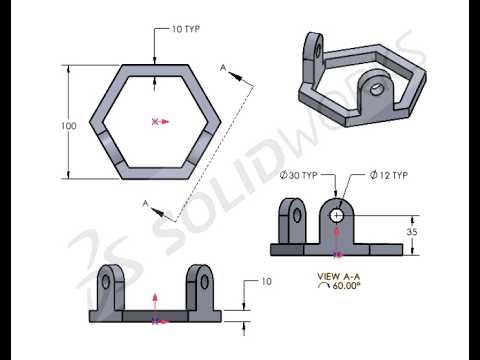
Whether you are a beginner looking to understand design fundamentals or an experienced draftsman refining your workflow, mastering 3D Mechanical CAD design is an essential step in modern engineering. SOLIDWORKS remains one of the most industry-standard tools for bringing complex mechanical concepts to life. In this practice guide, we walk through the step-by-step process of transforming a simple 2D sketch into a fully realized 3D model, bridging the gap between basic drafting and advanced solid modeling techniques.
Step 1: Building a Strong Foundation with 2D Sketching
Every detailed model starts with a precise 2D sketch. Before jumping into complex volumetric shapes, it is crucial to master geometric constraints, smart dimensions, and relations. Setting up your initial reference planes correctly ensures that your design remains parametric, stable, and easily adaptable to modifications later in the design process. Focusing on fully defined 2D sketches prevents downstream errors when performing feature operations.
Step 2: Transitioning from 2D Geometry to 3D Solid Features
Once your 2D profile is fully constrained, the real transformation begins. By utilizing core feature tools such as Extruded Boss/Base, Revolved Boss, and Extruded Cut, you can rapidly convert flat geometric drawings into accurate solid components. Mastering these fundamental features is vital for anyone striving to excel in 3D Mechanical CAD drafting. Adding secondary features like chamfers, fillets, and shell commands will further refine the model, ensuring it meets true functional manufacturing standards.
Step 3: Elevating Your Workflow from Basic to Advanced
As you progress through more challenging practice drawings, you will encounter complex geometries, multi-body parts, and curved surfaces. Continuous practice is key to building speed, accuracy, and confidence. Transitioning from basic shapes to intricate mechanical parts requires a thorough understanding of design intent and feature tree optimization.
Conclusion
Enhancing your 3D Mechanical CAD skills requires consistent practice and hands-on modeling experience. By following along with structured drawing exercises in SOLIDWORKS, you will quickly boost your modeling efficiency and technical problem-solving capabilities. Open your CAD software, load up the drawing specifications, and start building your next 3D model today!


