
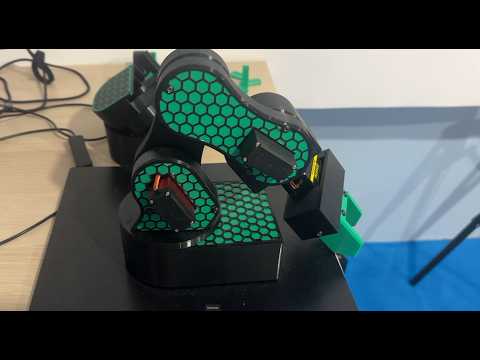
Hexagons are everywhere in the world of 3D printing. Known for their incredible strength-to-weight ratio and modern aesthetic, the "honeycomb" pattern is a favorite for everything from structural drone parts to decorative wall art. However, manually drawing dozens of individual shapes is tedious and prone to error. To truly level up your modeling skills, you need to harness the power of 3D parametric design.
Why Choose a Parametric Workflow?
The beauty of 3D parametric design lies in its flexibility. Instead of creating a static sketch, you define dimensions and constraints. In tools like Autodesk Fusion 360, this means you can set parameters for the diameter of your hexagon, the spacing between them, and the thickness of the walls. If you realize mid-project that the pattern is too dense, you simply adjust one numerical value, and the entire model updates automatically. This efficiency is what separates hobbyists from professional designers.
Step-by-Step: Creating the Perfect Hexagon Pattern
To get started, you begin with a single, perfectly constrained hexagon sketch. By using the "Rectangular Pattern" tool within your CAD software, you can tile this shape across your surface. The secret to a professional finish is ensuring that the spacing remains consistent.
Once your 2D pattern is established, you can extrude the shapes to create a mesh or cut them out of an existing solid body. This technique is particularly useful for creating breathable enclosures for electronics or lightweight infill structures that save on filament without sacrificing durability.
From Screen to Print
When you transition from design to the slicer, these patterns offer unique advantages. Because hexagons distribute stress evenly, your 3D printed parts become significantly more resilient. Furthermore, the geometric precision achieved through 3D parametric design ensures that your printer follows a logical, continuous path, reducing "stringing" and improving the overall surface finish of the final object.
Join the Design Community
Mastering these complex patterns takes practice, but you don’t have to do it alone. Sharing your progress and learning from others is the fastest way to improve your technical skills. If you are looking to dive deeper into advanced modeling techniques and connect with fellow enthusiasts, join our growing community at the Printlab Facebook group. Whether you are a beginner or a pro, there is always something new to discover in the world of functional 3D design.


