
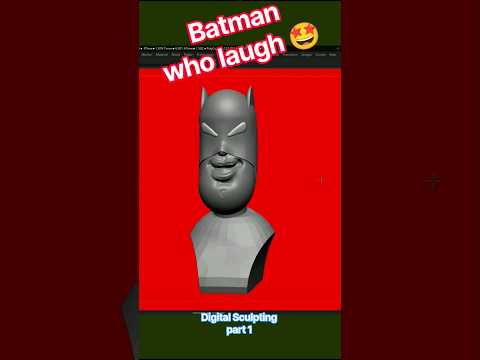
The Batman Who Laughs is undoubtedly one of the most terrifying and captivating characters introduced in DC Comics' Dark Multiverse. Combining the tactical brilliance of Batman with the chaotic madness of the Joker, this nightmare character demands a high level of detail and atmospheric sculpting. When it comes to bringing complex comic book villains to life, 3D ZBrush stands out as the ultimate digital sculpting tool for modern 3D artists.
In this fast-paced sculpting breakdown, we take a closer look at Part 1 of creating a high-detail digital sculpt of The Batman Who Laughs, focusing primarily on facial structure, terrifying expressions, and overall proportions.
Establishing the Sinister Facial Anatomy
In part 1 of this sculpting series, the main objective is establishing the dramatic silhouette and exaggerated facial features using 3D ZBrush. The key to capturing this iconic villain lies in his unsettling, maniacal grin and his dark, spiked leather visor.
Starting with a clean base head mesh, the initial phase centers on blocking out primary forms. By exaggerating the jawline, sharpening the cheekbones, and carving out an unnaturally wide mouth, you immediately establish a sense of dread. Standard brushes such as Move, ClayBuildup, and DamStandard are essential here to quickly transition from a standard head model into a menacing comic-accurate face.
Refining Expression and Micro-Details
Once the base proportions are locked in, the focus shifts toward secondary forms and character-defining details:
- The Iconic Smile: The teeth and exposed gums require meticulous brushwork to portray unhinged insanity.
- Expression Wrinkles: Deep skin folds and tension lines around the mouth and nose amplify the character's sinister energy.
- The Spiked Visor: Crafting the dark metal visor requires a clean blend of hard-surface techniques and organic detailing to ensure it sits perfectly across the brow.
Utilizing dynamic topology and custom alpha brushes allows you to add subtle skin tension, creases, and surface noise, bringing incredible realism to the fantasy model.
Elevate Your Character Design Workflow
Speed sculpting sessions are a fantastic way to improve your speed, accuracy, and form intuition. Whether you are a seasoned character artist or an enthusiastic beginner, sculpting dark fantasy figures in 3D ZBrush offers endless creative challenges and learning opportunities.
Keep practicing your primary shapes, master your brush strokes, and get ready for Part 2, where we will refine the fine details, leather textures, and final render setup!


