
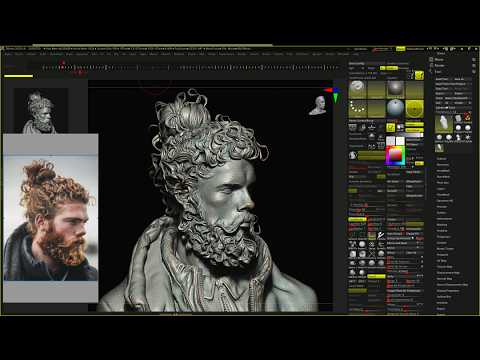
In the modern world of character design, the journey from a flat 2D sketch to a fully realized 3D model is one of the most rewarding creative processes an artist can experience. For creators looking to push their boundaries, 3D digital sculpting offers a unique way to translate the personality and depth of an illustration into a tactile, three-dimensional space. Using powerful tools like ZBrush, artists can breathe life into Pinterest references, turning static concepts into dynamic digital assets.
From Pinterest Inspiration to Basemesh
Every great project starts with a spark of inspiration. Platforms like Pinterest are goldmines for 2D character designs and environmental concepts that challenge an artist's technical skills. The process begins by meticulously analyzing the reference image for silhouettes, proportions, and key anatomical details.
Once the vision is clear, the next step involves establishing a solid basemesh. A well-structured basemesh acts as the skeleton of your project, providing the necessary topology to support high-frequency details later in the 3D digital sculpting process. Starting simple allows you to focus on the overall form before diving into the complexities of skin texture or clothing folds.
Optimizing Your Workflow with Professional Tools
Efficiency is key when working on complex sculpts. While a standard mouse and keyboard are functional, professional hardware can revolutionize your creative experience. Devices like the 3Dconnexion SpaceMouse Compact allow for fluid, 3D navigation, letting you pan, zoom, and rotate your model simultaneously with one hand while you sculpt with your pen tablet in the other.
Furthermore, integrating a macro keyboard into your setup can significantly reduce the time spent on repetitive tasks. By mapping your most-used ZBrush brushes and functions to dedicated keys, you can keep your focus entirely on the art rather than the interface.
Mastering the Fine Details
As the sculpt progresses, the true magic happens in the refinement stage. ZBrush provides an unparalleled toolkit for adding intricate details that define a character's story. This stage of 3D digital sculpting requires both patience and a keen eye for light and shadow. By focusing on how light interacts with different surfaces, you ensure your final render captures the same essence as the original 2D art while adding a layer of professional realism that only 3D can provide. Whether you are a hobbyist or a professional, mastering these techniques is the key to elevating your digital portfolio.


