
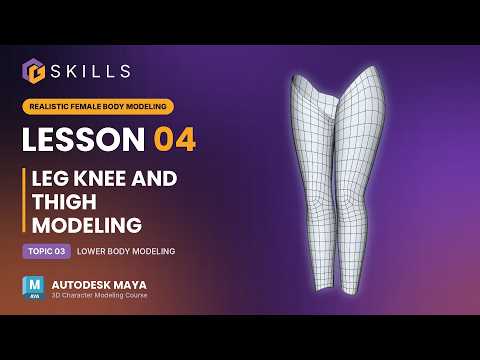
Creating realistic character models requires a solid understanding of both organic anatomy and clean topology. As you transition from the upper body to the lower limbs, capturing natural curves while maintaining an efficient mesh structure becomes crucial. In this guide, we dive into the fundamental techniques for modeling a female character's thigh, knee, and lower leg using 3D Maya.
Shaping the Thigh and Lower Leg
When starting on the lower body, your primary focus should always be establishing proper proportion and silhouette. Begin by extruding the polygon edges downward from the hip area to form the base structure of the thigh. Pay close attention to the natural curvature of the female leg—the thigh gently tapers down toward the knee, while the calf muscle creates a subtle, elegant outer curve on the lower leg.
Utilize reference images from multiple angles (front and side views) to ensure your model aligns accurately. Keeping your polygon count relatively low during the initial blocking phase makes it significantly easier to tweak shapes and adjust proportions before adding finer details.
Mastering Knee Topology for Deformable Joints
The knee is one of the most complex areas to model because it undergoes extreme deformation during character animation. A simple cylindrical shape will not suffice if you want realistic bending. You need to construct a dedicated topology layout around the kneecap (patella) and the back of the knee.
To achieve clean bending and deformation: - Define the Kneecap: Insert edge loops that outline the patella, giving it a firm structural boundary. - Maintain Joint Flexibility: Add extra horizontal edge loops across the joint line to support smooth mesh stretching when the leg bends. - Avoid Pinching: Ensure quads are evenly spaced around the joint to prevent undesirable shading artifacts.
Essential Tips for a Clean Workflow
Working with 3D Maya offers a suite of powerful modeling tools like the Quad Draw, Multi-Cut, and Insert Edge Loop tools to refine your mesh efficiently. As you build out the lower body, constantly switch between smooth preview mode and standard display mode to inspect how your surfaces react to subdivision.
By mastering clean edge flow across the thigh, knee, and lower leg, you set a strong foundation for the rest of your character pipeline. Practice these techniques inside 3D Maya to elevate your 3D character creation skills to a professional standard!


