
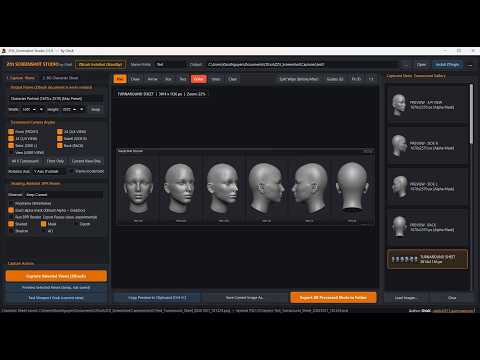
Showcasing high-detail renders and work-in-progress sculpts is an essential part of every digital artist's daily routine. Whether you are presenting progress to a client or building an ArtStation portfolio, capturing crisp visuals directly from your viewport can make a massive difference. If you regularly use 3D ZBrush to craft complex characters and environments, having a streamlined way to snap and save your work is a total game-changer.
That is where the ZOt Screenshot Tool comes in—a free, lightweight utility tailored specifically for artists looking to optimize their visual documentation.
Why You Need a Dedicated Screenshot Tool
Standard screen capture tools often interrupt your creative flow, requiring manual cropping or extra steps to save files in the right folder. When sculpting high-poly models in 3D ZBrush, taking frequent snapshots shouldn't slow down your artistic momentum.
The ZOt Screenshot Tool solves this hassle by offering a fast, intuitive capture process. Designed specifically with the needs of digital sculptors in mind, it allows you to capture clean, sharp viewport images in seconds so you can remain focused on creating great art.
Key Benefits of the ZOt Screenshot Tool
- Tailored for Artists: Focus on capturing your digital sculpts with precision and clean framing.
- 100% Free: You can grab this tool on Gumroad without spending a dime, making it an essential addition to any pipeline.
- Lightweight & Efficient: Operates seamlessly without adding heavy performance overhead to your system.
- Effortless Sharing: Perfect for posting quick WIP updates on social media, Discord, or client review boards.
How to Get Started
Getting your hands on this handy utility is simple. You can download the ZOt Screenshot Capture Tool for free directly from Gumroad (https://darko0311.gumroad.com/l/wxsnun). Installation is quick, allowing you to incorporate instant screen captures into your daily sculpting routine immediately.
Elevate your presentation standards and save valuable time during your detailing phase. Give the ZOt Screenshot Tool a try today and take your 3D ZBrush presentation workflow to the next level!


