
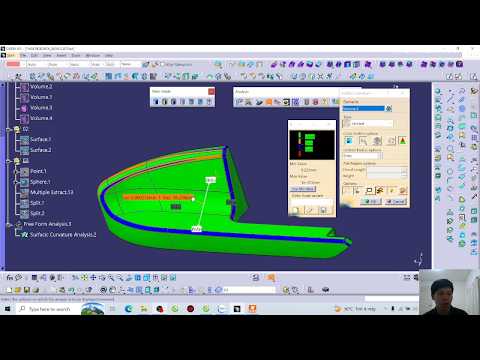
When designing complex engineering components, ensuring smooth aesthetic transitions and high manufacturing quality is crucial. For CAD professionals working with 3D Catia, evaluating surface quality is a fundamental skill. One of the most powerful features for this purpose in CATIA V5 is the Surface Curvature Analysis tool.
In this article, we will explore how this tool works and why analyzing radius (R) variations is essential for achieving flawless surface modeling.
Understanding Surface Curvature Analysis
Surface Curvature Analysis allows designers to visually inspect and evaluate the radius of curvature across a 3D model. Instead of relying solely on manual inspection, CATIA V5 applies a dynamic, color-coded mapping across the surface. This color spectrum directly represents variations in the radius (R), making it remarkably easy to identify sudden curvature changes, surface discontinuities, or unintended flat spots.
Key Steps to Analyze Radius Variations in CATIA V5
To perform a surface curvature analysis effectively, follow these core steps within your workspace:
- Activate the Tool: Navigate to the analysis toolbar and select the Surface Curvature Analysis option.
- Select the Target Surface: Click on the specific 3D surface or component you want to evaluate.
- Configure the Mapping Parameters: Set the minimum and maximum radius limits to match your specific engineering or manufacturing requirements.
- Interpret the Color Spectrum: Review the generated color map. Smooth gradient transitions indicate gradual radius variations, while abrupt color breaks highlight potential surface flaws or sharp curvature shifts.
Why Is Curvature Analysis Crucial for CAD Designers?
Consistently performing curvature analysis in 3D Catia offers several practical benefits for industrial design and product engineering:
- Superior Aesthetic Quality: Ensures high-level surface continuity, which is vital for automotive, aerospace, and consumer product design.
- Improved Manufacturability: Helps detect areas where the radius is too tight for tooling, sheet metal stamping, or plastic injection molding.
- Early Defect Detection: Catches subtle surface glitches early in the design cycle, saving time and reducing costly redesigns during physical prototyping.
Conclusion
Mastering the Surface Curvature Analysis tool is vital for anyone aiming to produce high-precision, production-ready models in 3D Catia. By regularly evaluating radius variations during your surface modeling workflow, you can ensure that your designs are visually refined, geometrically accurate, and optimized for manufacturing.


