
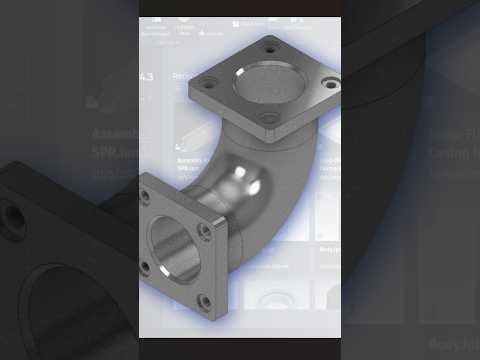
3D mechanical modeling is an essential skill for modern engineers and industrial designers. Whether you are creating intricate assemblies or standard piping components, knowing how to leverage professional CAD software like Autodesk Inventor can drastically speed up your design workflow. Among the most common mechanical parts you will encounter is the 90-degree elbow flange—a critical component used in fluid routing systems to divert flow while providing secure bolt connections.
In this quick guide, we will walk through the core features required to model a precise 90-degree elbow flange efficiently.
Key Features You Need to Master
To build a realistic elbow flange, you do not need dozens of complicated steps. Instead, mastering four fundamental tools available in modern CAD software will get the job done quickly:
- Sweep Tool: Generates the curved pipe body by extruding a circular profile along a 90-degree arc path.
- Work Planes: Crucial for creating reference geometry at the open ends of the elbow where the connecting flanges reside.
- Fillet: Adds smooth, rounded transitions between the pipe body and the flange faces to reduce stress concentrations.
- Chamfer: Bevels sharp edges to facilitate easier assembly and prevent material chipping during manufacturing.
Step-by-Step Workflow Overview
- Draw the Path and Profile: Start by sketching a 90-degree arc on a 2D plane to act as your sweep trajectory. On a perpendicular plane, sketch the circular cross-section of the pipe and execute the Sweep feature to build the solid curved body.
- Construct the End Flanges: Create custom Work Planes at both terminal ends of the curved pipe. Sketch the circular flange outlines, along with the bolt hole pattern, and extrude them to the desired thickness.
- Apply Finishing Touches: Perfect your 3D model by applying Fillets along the inner joints where the flange meets the pipe body, and add Chamfers along the bolt holes and bore entries for a clean, professional finish.
Final Thoughts
Understanding these foundational techniques allows designers to produce complex mechanical components in a matter of minutes. Consistently practicing simple models like elbow flanges is one of the best ways to sharpen your skills and maximize your efficiency when using advanced CAD software. Give this simple workflow a try in your next design project!


