
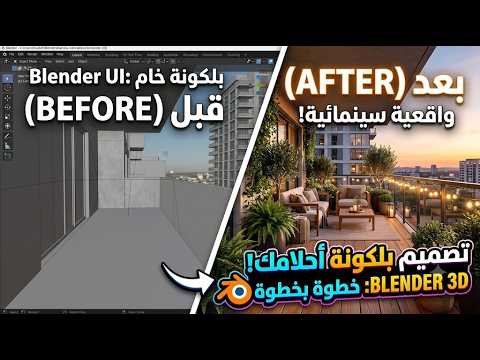
Ever wanted to transform a simple digital space into a cozy, photorealistic outdoor retreat? Creating realistic architectural scenes is one of the most rewarding skills you can master in 3D Blender. In this step-by-step guide, we will walk through the entire process of designing a stunning, lifelike balcony from scratch.
Step 1: Blocking Out the Basic Architecture
Every great 3D model starts with a solid foundation. Begin by blocking out the primary structural elements of the balcony. Use basic primitives to build the surrounding walls, floor slab, and glass sliding doors. Pay close attention to real-world measurements and proportions to ensure your scene feels believable. Adding architectural details like railings, window frames, and wall trims early on helps set the correct scale for the rest of your project.
Step 2: Decorating and Furniture Placement
Once the main framework is ready, it is time to bring the balcony to life with outdoor furnishings. Populate your scene with cozy patio furniture, such as a stylish woven chair, a small coffee table, and ambient hanging lights. To boost realism in 3D Blender, incorporate lush greenery—potted plants, cascading vines, and subtle surface details make a massive difference in breaking up artificial perfection.
Step 3: Texturing and Material Setup
Realistic materials are key to convincing architectural renders. Apply high-resolution PBR (Physically Based Rendering) textures to your models. Use bump and roughness maps for concrete walls, wooden deck flooring, and metal railings. Experiment with procedural shaders inside the node editor to add realistic wear, weather marks, and subtle color variations across your assets.
Step 4: Lighting and Final Render
Lighting can make or break an architectural scene. Utilize an HDRI environment image combined with a direct Sun Light to simulate natural outdoor daylight streaming onto the balcony. Fine-tune your exposure, light intensity, and shadow softness. Finally, switch to the Cycles render engine, enable camera depth-of-field for a cinematic touch, and render your final masterpiece.
Whether you are a beginner or an experienced artist looking to refine your arch-viz workflow, mastering these practical techniques in 3D Blender will help you create breathtaking environments. Happy blending!


