
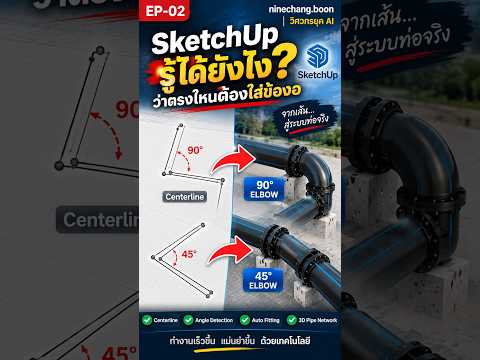
Designing complex piping systems manually can be a time-consuming challenge for civil engineers and BIM modelers. Fortunately, modern workflow extensions in 3D SketchUp allow you to streamline this process significantly. Instead of constructing every pipe fitting individually, you can automatically transform simple guide lines into precise 45° or 90° pipe elbows in seconds.
How Centerline Automation Works
The secret behind this efficient technique lies in how specialized plugins analyze basic 2D layout lines. When a centerline changes direction, the extension reads the exact intersection point and calculates the angle of the turn.
Based on the detected geometry, the tool instantly generates standard pipe components: * 90° Elbows: Created automatically when the centerline turns at a sharp right angle. * 45° Elbows: Formed seamlessly when the line takes a diagonal turn.
By utilizing smart extensions like BET Extension Tools, 3D SketchUp removes the hassle of manually measuring, rotating, and snapping pipe fittings at every junction.
Key Benefits for Civil Engineers and Modelers
- Unmatched Speed: Transform a complex network of centerlines into full 3D piping layouts with a single click.
- Flawless Precision: Eliminate human alignment errors by letting software algorithms match pipe angles perfectly.
- Flexible Editing: Modify your pipe routing quickly by adjusting the 2D guide lines before generating the final 3D geometry.
Final Thoughts
Integrating centerline conversion techniques into your 3D SketchUp toolkit transforms a tedious drafting process into a fast, accurate, and professional modeling workflow. Whether you are working on MEP systems, civil engineering projects, or industrial plant designs, mastering these extension tools will save you valuable time and boost your overall productivity.


